How to Fix a Slow Ceiling Fan: Troubleshooting & Repair
Want this done properly without the hassle?
Aap DIY try kar sakte hain, lekin agar time nahi ya confidence kam ho, to professional bula lena better hota hai. Galat step se damage ya safety issue ho sakta hai.
Starting from
Rs. 500
Quick answer (read this first)
- A slow ceiling fan is often caused by a faulty regulator, dirty or bent blades, or a struggling motor. Begin by checking the regulator’s settings and cleanliness of the blades. Always ensure power is off before any physical inspection or work. If basic checks don’t help, the issue might be electrical or mechanical, requiring further diagnosis or professional help.
Safety first
- ALWAYS turn off the main circuit breaker or fuse box for the fan’s circuit before attempting any work.
- Verify power is OFF using a voltage tester before touching any wires or components.
- Never work with wet hands or while standing on a wet surface.
- Use insulated tools and avoid touching bare wires.
- Wear appropriate personal protective equipment, such as safety glasses and electrical gloves (if handling wiring).
- If you are unsure or uncomfortable at any point, STOP and call a qualified electrician.
Tools you may need
- Screwdriver set (Phillips and flathead)
- Voltage tester or Multimeter (Essential for electrical checks)
- Dusting cloth or brush
- Sturdy stepladder
- Electrical tape (insulated)
- Gloves (optional, for grip/cleanliness)
Step-by-step
- Prioritize Safety: Disconnect Power. Locate the circuit breaker or fuse box that controls the ceiling fan and switch it OFF. Crucially, use a voltage tester or multimeter to confirm there is absolutely no power flowing to the fan or its wall switch before proceeding.
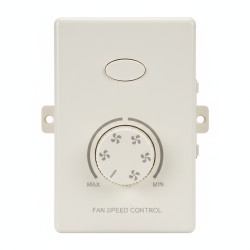
- Examine the Fan Regulator/Speed Control. Visually inspect the regulator switch on the wall. Does it feel loose? Are there any visible signs of damage, burn marks, or unusual odors? Test by moving the switch through all speed settings; if there’s no change or the fan only works on one setting, the regulator might be faulty.
- Clean Fan Blades and Inspect for Damage. Using a sturdy stepladder, carefully clean any dust, dirt, or grime accumulated on both sides of the fan blades. Heavy buildup can create drag and slow down the fan. While cleaning, check for any bent, warped, or cracked blades, as misalignment can also affect performance.
- Inspect Regulator Wiring (Advanced). Only proceed if you are comfortable and have basic electrical knowledge. With power CONFIRMED OFF (re-verify with voltage tester), carefully open the wall switch casing for the regulator. Look for any loose, corroded, or burnt wires. Securely re-tighten any loose terminal screws. If wires appear burnt or extensively damaged, DO NOT attempt to repair; this indicates a serious electrical fault.
- Consider Regulator Replacement. If you’ve identified the regulator as the likely culprit (e.g., burn marks, no speed changes) and are confident in your electrical skills, you can replace it with a new regulator of the same wattage rating. Ensure power is OFF and verified OFF before disconnecting the old unit and wiring the new one according to its instructions. Improper wiring can be hazardous.
- Restore Power and Test. Once all inspections and potential repairs (like a regulator replacement) are complete and the casing is securely closed, switch the power back ON at the circuit breaker. Test the fan through all its speed settings. If the issue persists or any new problems arise, proceed to the ‘When to Call a Professional’ section.
Common mistakes
- Failing to absolutely confirm power is off before starting any electrical work.
- Overlooking visual cues like burnt wires or unusual smells.
- Attempting electrical repairs beyond your comfort or skill level.
- Neglecting regular cleaning of fan blades, which causes air drag.
- Installing a fan regulator that isn’t compatible with your fan’s wattage or type.
When to call a professional
- If you are hesitant or lack confidence in performing any electrical inspection or repair.
- If the fan motor produces grinding sounds, wobbles excessively, or becomes unusually hot to touch.
- If you smell burning plastic or an electrical odor from the fan, switch, or wiring.
- After replacing the regulator, if the fan speed remains slow or the problem persists.
- If you observe sparks, flickering lights, or circuit breaker trips when the fan is operating or turned on.
- If you encounter complex wiring, damaged motor components, or any issue you cannot safely diagnose or fix.
Want this done properly without the hassle?
Aap DIY try kar sakte hain, lekin agar time nahi ya confidence kam ho, to professional bula lena better hota hai. Galat step se damage ya safety issue ho sakta hai.
Starting from
Rs. 500
100% Money Back Guarantee
If you are not satisfied with the service