How to Troubleshoot LED TV Mounting Issues
Want this done properly without the hassle?
Aap DIY try kar sakte hain, lekin agar time nahi ya confidence kam ho, to professional bula lena better hota hai. Galat step se damage ya safety issue ho sakta hai.
Quick answer (read this first)
- Check all cables for proper connection.
- Verify the wall mount’s stability.
- Restart the TV and connected devices.
- Ensure power supply is active.
Safety first
- Always unplug the TV before making any adjustments.
- Work with a helper to prevent dropping the TV.
- Do not attempt electrical repairs unless qualified.
- Wear appropriate safety gear like gloves.
- Ensure the wall is suitable for mounting weight and integrity.
Tools you may need
- Screwdriver set (Phillips, flathead)
- Spirit level
- Measuring tape
- Stud finder (if available)
- Pliers
- Torch/flashlight
Step-by-step
Step 1
Prioritize Safety & Unplug: Always start by unplugging the TV from the power outlet to avoid electrical hazards. If the TV is already off, confirm it’s completely disconnected.
Step 2
Inspect TV-to-Mount Connection: Carefully check if the TV is securely fastened to the mounting brackets. Ensure all screws attaching the TV to the mount are tight and any safety clips or locks are engaged.
Step 3
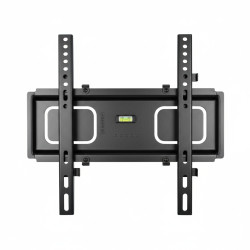
Examine Mount-to-Wall Stability: Gently test the wall mount itself for any looseness, wobbling, or visible gaps between the mount and the wall. Look for cracks in the wall around the mounting points or loose anchors.
Step 4
Check for Obstructions or Cable Stress: Look behind the TV and around the mount. Ensure no cables are pinched, taut, or preventing the TV from sitting flush on the mount. Verify no external objects are putting pressure on the TV or mount.
Step 5
Verify TV Level and Alignment: Use a spirit level to check if the TV is perfectly horizontal. Misalignment can indicate a shifted mount, uneven installation, or issues with the wall anchors.
Step 6
Assess All Mounting Hardware: With the TV safely secured or with a helper, visually inspect all screws, bolts, and anchors connecting the mount to the wall. Ensure none are stripped, bent, or visibly failing, and that they are all properly tightened without over-torquing.
Common mistakes
- Not unplugging the TV before adjustments.
- Ignoring the weight capacity of the mount or wall.
- Over-tightening screws and damaging the TV or wall.
- Mounting into drywall without proper anchors/studs.
- Assuming an issue is major before basic troubleshooting.
When to call a professional
- If the mount feels unstable or is visibly damaged.
- When electrical issues (e.g., no power, sparks) are suspected.
- If you’re unsure about the structural integrity of your wall.
- When the TV needs to be removed from a difficult position.
- If you lack the proper tools or expertise for the job.
Want this done properly without the hassle?
Aap DIY try kar sakte hain, lekin agar time nahi ya confidence kam ho, to professional bula lena better hota hai. Galat step se damage ya safety issue ho sakta hai.