How to prevent common Led Tv Mounting 32 42 problems and when to call a pro
Want this done properly without the hassle?
Aap DIY try kar sakte hain, lekin agar time nahi ya confidence kam ho, to professional bula lena better hota hai. Galat step se damage ya safety issue ho sakta hai.
Quick answer (read this first)
- Select a TV mount and wall location appropriate for your LED TV’s size (32-42 inches) and weight.
- Always use a stud finder and a circuit/pipe scanner to ensure secure mounting to studs and avoid utilities.
- Verify that all mounting hardware is compatible with your specific wall type (e.g., brick, concrete, drywall).
- Adhere to the TV and mount manufacturer’s weight limits and installation instructions precisely.
- Implement proper cable management for a clean look and to prevent hazards.
Safety first
- Always unplug the TV and any connected devices before starting work.
- Wear safety glasses and work gloves to protect yourself.
- Have at least one helper to assist with lifting and positioning the TV.
- Use a circuit/pipe scanner to avoid drilling into electrical wires or water pipes.
- Never overload the TV mount or wall beyond their specified weight limits.
Tools you may need
- Drill and appropriate drill bits
- Stud finder
- Level
- Measuring tape
- Pencil
- Screwdriver set
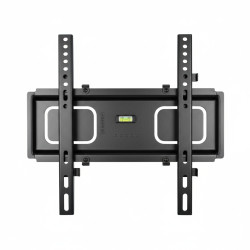
- TV mount kit (with all hardware)
- Optional: Circuit/pipe scanner
Step-by-step
Step 1
Preparation: Unpack the TV mount, organize all components, and verify against the manufacturer’s instructions for completeness. Read through the entire manual before starting.
Step 2
Determine Placement: Decide on the optimal viewing height and position for your LED TV. Mark the approximate center point on the wall with a pencil.
Step 3
Locate Studs & Scan for Utilities: Use a stud finder to precisely locate and mark the center of wall studs (wood or metal beams) where the mount will be anchored. Crucially, use a circuit/pipe scanner to check for any electrical wires, pipes, or other hidden utilities within the drilling area. Do not proceed if utilities are detected directly behind your marked drilling spots.
Step 4
Mark Pilot Holes: Hold the wall mount bracket against the marked stud locations. Use a level to ensure it’s perfectly horizontal. Mark the exact points for drilling pilot holes, ensuring they align with the studs.
Step 5
Drill & Secure Wall Plate: Carefully drill pilot holes according to the mount manufacturer’s specified depth and diameter. Securely attach the wall plate of the TV mount to the wall studs using the provided heavy-duty anchors and screws. Ensure it is firmly fixed and perfectly level.
Step 6
Attach TV Brackets: Securely attach the mounting brackets to the back of your LED TV. Double-check that they are firmly tightened, correctly oriented, and compatible with the wall mount’s hooking mechanism.
Step 7
Mount the TV: With at least one helper, carefully lift the LED TV and hook its brackets onto the wall mount’s wall plate. Ensure the TV is securely seated and locked into place, often with a ‘click’ or a locking screw/bar.
Step 8
Cable Management: Connect all necessary cables (power, HDMI, etc.). Route them neatly using the mount’s integrated cable management system or secure them with cable ties for a clean, hazard-free setup.
Common mistakes
- Mounting the TV directly into drywall without securing to a stud.
- Using incorrect or insufficient anchors for the wall type.
- Not checking for electrical wiring or plumbing behind the wall before drilling.
- Underestimating the TV’s weight or exceeding the mount’s weight capacity.
- Failing to use a level, resulting in a crooked TV.
- Ignoring the manufacturer’s installation instructions.
- Attempting to lift and mount the TV alone, risking injury or damage.
When to call a professional
- If you cannot locate wall studs or are unsure about the structural integrity of your wall.
- If you have a specialized wall type, like concrete, old plaster, or hollow block, that requires specific tools or expertise.
- If you encounter any electrical wires or plumbing during drilling attempts.
- If you lack the proper tools, a suitable helper, or confidence in your DIY skills.
- For very large or heavy TVs that require extra precision and support.
- For complex installations, such as fireplace mounts, articulating mounts, or integrated hidden wiring solutions.
Want this done properly without the hassle?
Aap DIY try kar sakte hain, lekin agar time nahi ya confidence kam ho, to professional bula lena better hota hai. Galat step se damage ya safety issue ho sakta hai.